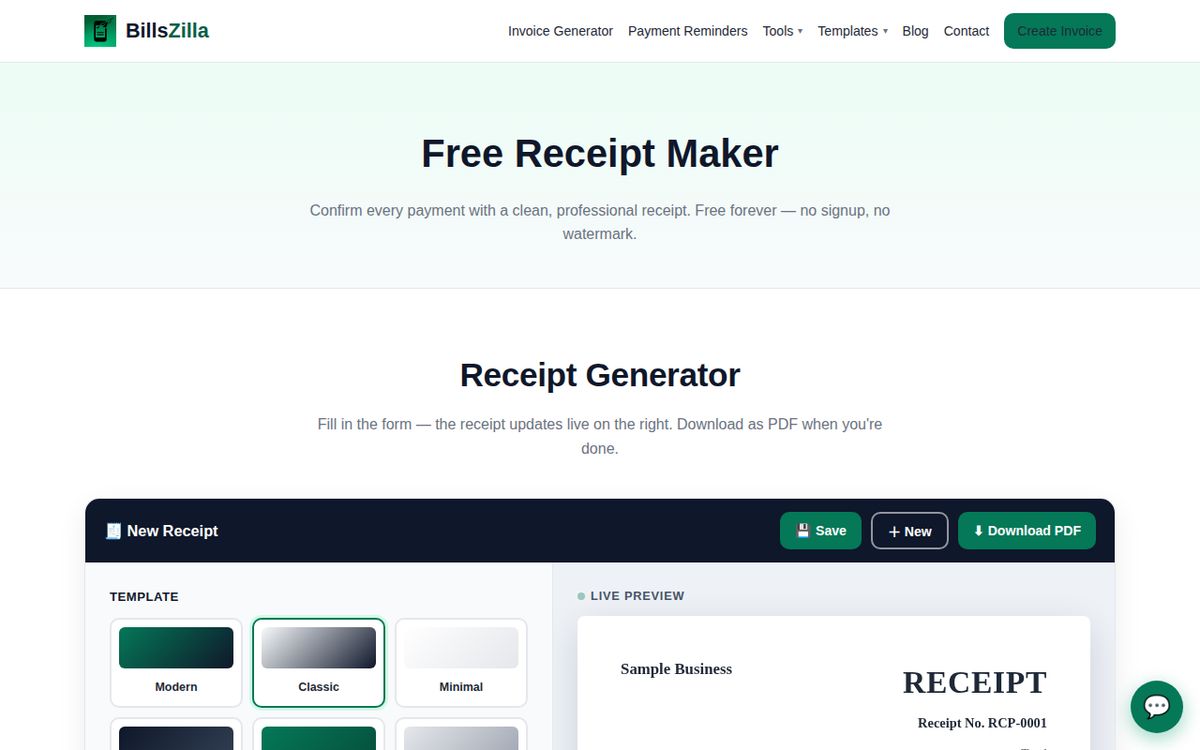
Confirm every payment with a clean, professional receipt. Free forever — no signup, no watermark.
The BillsZilla receipt maker — the receipt updates live as you type.
Receipt Generator
Fill in the form — the receipt updates live on the right. Download as PDF when you're done.
🧾 New Receipt
Live preview
📁 Saved receipts (this browser only)
How to make a receipt: the 7 things every receipt needs
A receipt is only useful if someone can tell, months later, who paid, for what, and how much. Whatever tool you use — including this one — make sure these seven things are on it:
Your business name and contact details. So the payer knows exactly who received the money.
A unique receipt number. Sequential and never reused (RCP-0001, RCP-0002…), so every payment can be found again.
The payment date. The day the money actually landed — not the date of the original invoice.
Who paid. The client's name, and address if you have it.
What was paid for. An itemised list of goods or services. Vague lines like “services” cause disputes; specific lines end them.
The total amount and currency. Including any tax charged, so the figure matches your books exactly.
How it was paid — and whether anything is still owed. Cash, bank transfer, card or wallet, plus either “paid in full” or the remaining balance.
One distinction matters: a receipt is not an invoice. The invoice asks for payment; the receipt confirms payment arrived. Issue the receipt right after the money lands, keep a copy for your records, and use the invoice generator first whenever payment is still owed.
How to create a receipt in 3 steps
Fill in who paid and for what. Add your business details, the client's name, and line items describing the goods or services paid for.
Record the payment. Set the payment date, method, and receipt number — BillsZilla numbers receipts automatically (RCP-0001, RCP-0002…).
Download or share the PDF. Send the receipt via WhatsApp or Email, or print it — free forever, no signup, no watermark.
Why issue professional receipts
A receipt is proof of payment — it protects you in disputes, keeps your bookkeeping clean, and reassures clients. BillsZilla's receipt generator gives you 6 templates, 50+ currencies, and a "paid" workflow that pairs with the free invoice generator: invoice first, receipt when the money lands.
Receipt generator FAQ
An invoice asks for payment; a receipt confirms payment was received. Send a receipt right after the money lands — it keeps your books clean and your clients confident.
Yes — unlimited receipts, no watermark, no account. Receipt numbers start at RCP-0001 and increment automatically.
Your business name, the client's name, a unique receipt number, the payment date, a list of what was paid for, the total amount, and how it was paid. BillsZilla's generator covers all of these.
Yes. Upload your logo once and it appears on every receipt preview and PDF — free, with no watermark.
They're closely related: a receipt is the document you issue to confirm you received money. A bank statement or transfer confirmation is proof from the payment provider. For clean records, issue a proper receipt for every payment you receive.
Yes — keep copies for at least your local tax retention period (often 5–7 years depending on country). BillsZilla saves every receipt in your browser history, and you can download PDFs for your records.
No. An invoice documents what is owed; a receipt documents what was paid. Most tax authorities expect both in your records. Use the invoice generator first, then issue the receipt on payment.
Yes — record how the client paid (bank transfer, cash, card, wallet) in the payment details, and it appears on the receipt.
Use the generator above: fill in your business details, the client, and what was paid for, then download the PDF. No signup, no watermark, unlimited receipts.
A tool that turns your business details, client, items and totals into a properly formatted receipt you can download or print — instead of typing one out by hand or wrestling with a blank document.
If you charged tax, show it: the total on the receipt should match what the client actually paid, tax included. The generator's tax modes cover flat tax, per-line tax and GST.
Yes. Record the amount actually received and note the remaining balance in the notes or payment details, so both you and the client can see what is still owed.
Not usually: what makes a receipt work as a record is the business name, date, amount, payer and receipt number. Some businesses still add a signature for cash payments — the notes field is there if you want to record one.